
Assessment data matters when it helps you decide what a learner needs next. Tracking student assessment results online brings curriculum outcomes and progress records into clearer view, making it easier to identify support needs and compare attainment across a group. The goal is not simply to collect scores, but to use evidence to guide teaching and learning.
Assessment results are more useful when they have context. A mark or outcome shows what a pupil achieved in one task, while patterns across assessments may reveal developing strengths or areas needing attention. Reviewing records thoughtfully helps you decide what to teach next, which questions to explore and how to discuss progress with others.
This article explains why assessment information matters, how online tracking can support decisions about learners, and what to consider when recording achievement against curriculum outcomes. It also looks at how group comparisons can inform planning, so you can use assessment data purposefully without letting administration distract from teaching.
Key Takeaways
- Use assessment evidence to understand each learner’s progress and decide what teaching support may help next.
- Review attendance alongside assessment results to spot patterns that may need attention.
- Record achievement against clear curriculum outcomes so progress is easier to interpret over time.
- Compare group results to identify outcomes that may need revisiting and learners who could benefit from extension.
- Keep records current and add context where it helps you plan support and discuss progress.
Table of Contents
- Why tracking student data important?
- Identifying pupils who need extra support or extension
- Recording achievement against curriculum outcomes
- Group attainment comparisons
- Online pupil assessment tracking
- Paritor: Xperios for Music Services
Why tracking student data important?
Attendance and assessment records show different parts of a learner’s experience. Reviewing both can help you make informed decisions about teaching, support and resources. Data is useful when it points to a practical next step, rather than sitting unused in a report.
Accessing attendance and performance data
Online access can bring attendance information and assessment records together for review. If a pupil’s results change after missed sessions, you can consider whether gaps in participation affected their learning. ACER’s Centre for Assessment Reform and Innovation describes assessment as a starting point for understanding learners’ current progress and monitoring it over time. A shared view can help teachers discuss progress with colleagues and plan what to investigate next.
Reducing spreadsheet work and duplicated data
Separate spreadsheets can leave staff checking several versions of the same information. A central digital record gives authorised staff one place to enter and review outcomes. For example, when a teacher corrects an entry, colleagues can refer to the updated record instead of reconciling multiple files. Agreeing common labels also helps staff interpret results consistently and spend less time sorting records.
Informing teaching with assessment data
Assessment evidence can show which parts of a lesson pupils understand and where teaching may need adjustment. If several learners misunderstand the same instruction, you could clarify it or use a different example. If one pupil struggles with a particular skill, focused practice may be more useful than repeating the full topic. A hinge question or short, low-stakes quiz can give teachers timely insight during learning.
Learning analytics can reveal patterns across attendance, participation and assessment performance. For example, if a class struggles with one task, review its wording and the lesson that prepared pupils for it. Compare similar assessments and outcomes before drawing conclusions. This helps distinguish a pattern worth acting on from a result shaped by different tasks or circumstances.
Group evidence can also inform funding discussions. A school might review unmet learning outcomes and attendance patterns when considering where additional support could help. Use the figures to guide discussion alongside the purpose of the provision and pupils’ circumstances. Assessment information can inform decisions, but it should not be treated as the whole picture of a learner or group.
For UK student records, data protection regulations include UK GDPR, which covers the handling of personal and sensitive data. Reduce practical risks by limiting access to staff who need the information, correcting inaccurate entries and using secure storage. For instance, review permissions when a staff member changes role, and ensure shared devices are not left displaying pupil records.
The right tracking system depends on the school’s assessment framework, the records staff need to maintain and the reports they need to prepare. Map those tasks before selecting a platform, so it supports teaching without creating another record-keeping process.
Identifying pupils who need extra support or extension
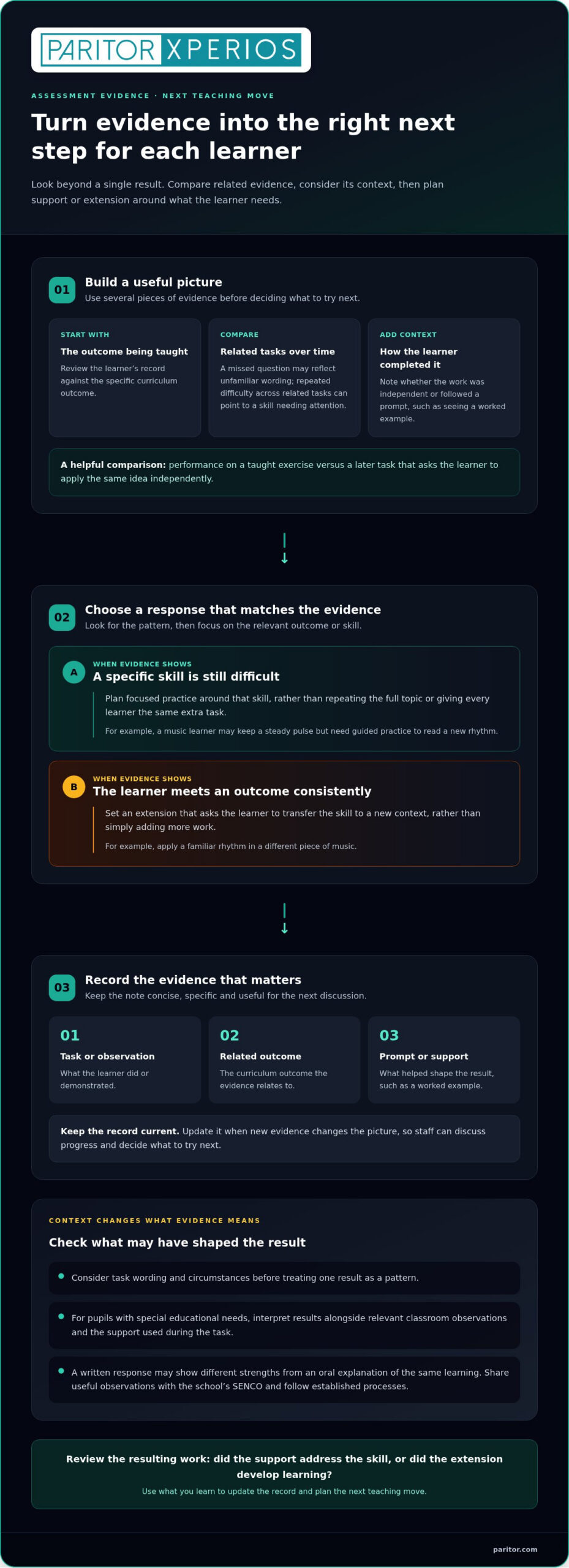
Use several pieces of evidence to decide whether a pupil needs a different level of challenge. One missed question may reflect unfamiliar wording, while repeated difficulty across related tasks can point to a skill needing attention. For example, compare a learner’s performance on a taught exercise with a later task requiring them to apply the same idea independently. That contrast gives you more context than one result alone.
Review each learner’s record against the outcomes being taught, then note what the evidence suggests. A pupil may be secure in one part of a topic but find another difficult. For a music learner, that might mean keeping a steady pulse but needing guided practice to read a new rhythm. Plan support around the specific gap instead of assigning the same extra task to every pupil.
Keep evidence concise and useful. Record the task or observation, the outcome it relates to, and any prompt that shaped the result. For instance, note whether a learner completed a practical exercise independently or after seeing a worked example. Update the entry when new evidence changes the picture. This gives teachers and school leaders a clearer basis for discussing student progress and deciding what to try next.
For pupils with special educational needs (SEN), interpret results alongside relevant classroom observations and the support used during the task. A written response, for example, may show different strengths from an oral explanation of the same learning. Share useful observations with the school’s special educational needs co-ordinator (SENCO) and follow the school’s established processes. This helps staff consider how the assessment format may affect what a pupil can demonstrate.
Extension should respond to evidence, not simply add more work. If a learner meets an outcome consistently, set a task that asks them to transfer the skill to a new context. A pupil confident with a familiar rhythm, for example, could apply it in a different piece of music. Review the resulting work to see whether the challenge developed learning or exposed a skill that still needs practice.
Shared guidance can help staff record judgements in a consistent way. A short help guide might define the school’s assessment labels and show an example entry; a webinar can let teachers discuss how they would assess the same piece of work. For staff learning to use a digital record, online student progress tools can form part of that wider conversation about practical assessment workflows.
Recording achievement against curriculum outcomes
Curriculum-linked assessment records show what a learner can do against a course’s intended outcomes. According to Ofsted, pupil progress is the extent to which pupils know more, remember more and can do more of what the curriculum intends. Recording results against specific outcomes helps you describe progress clearly, rather than relying on a general impression or one overall grade.
Start with the framework your school or service teaches, then choose outcomes that match its learning sequence. A music course, for example, might include reading notation, performing a passage and reflecting on a performance. Keep each outcome distinct, so a result for one skill does not conceal a different area of development. If you work across courses, label each framework clearly to prevent staff recording progress against the wrong expectations.
A simple tracker can list curriculum outcomes down the left-hand side and student names across the top. Each cell records achievement for one learner and one outcome. In trackers using the described scale, enter 1 when a student has met the target, 2 when they are working towards it, and 3 when they have not yet achieved it and may need further support. Where available, e can indicate that a student is exceeding the outcome.
Agree what evidence supports each judgement before staff enter results. A rubric can set out observable criteria, such as accurate rhythm, secure technique or a clear explanation of a skill. Rubrics give teachers a structured way to evaluate work and support fair, consistent grading. Add a brief note when a result needs context, such as whether a student performed independently or used a prompt.
Curriculum-linked records also make reports more informative. Instead of writing that a learner is “making progress”, identify the outcomes they have achieved and the skills still developing. For example, a report might distinguish secure notation reading from a performance technique that needs more practice. That detail can support useful conversations with pupils, families and colleagues while keeping feedback connected to the course’s learning goals.
Review the framework when course content changes, and make sure staff use the current version. A platform should make it straightforward to find the right outcomes and record results consistently. Before a reporting period, check for blank entries, unclear notes and results that no longer reflect recent evidence. This review helps ensure the record communicates achievement accurately and gives teaching teams a sound basis for planning what comes next.
Group attainment comparisons
Comparing group attainment helps you see whether learners are progressing similarly against a shared target. Review the whole class’s results for the same assessment, then look for outcomes where several pupils show difficulty. If a class struggles with a particular technique, the pattern may point to a teaching task that needs clarification, rather than separate issues for each pupil.
Start with a fair comparison. Use the same assessment, outcome and criteria for the group, and consider whether learners had similar opportunities to practise. A result from a practical performance may not be directly comparable with written work. Tracking software can organise results by class or outcome, making monitoring easier, but the comparison still depends on consistent assessment conditions.
Look for patterns before deciding what to change. If several pupils miss the same target, review the lesson materials and task instructions. For example, if learners interpret a question differently, clearer wording or a worked example may help. If results vary widely, compare evidence for each outcome and check whether a smaller group needs focused teaching. Group analysis guides decisions, but does not explain every result on its own.
Group attainment can also help you plan targeted sessions. Identify pupils working towards the same outcome, then group them for practice that addresses that specific need. A group already meeting the target may benefit from an extension task that applies the skill in a new context. Keep the individual student in view: shared results can guide grouping, while personal evidence shapes the next step for each learner.
Compare results over time to see whether a teaching adjustment is followed by a change in attainment. For instance, review the same outcome after an introductory lesson, midway through a unit and at its end. This sequence can show whether pupils are making progress and whether a teaching approach needs further adjustment. Record the assessment context alongside each result, so later comparisons do not treat different tasks as identical.
Present findings in a way that supports action. A class view organised by outcome can help teachers identify shared gaps, while a group view can inform planning for targeted support. Discuss patterns with colleagues and include the evidence behind your conclusions. If attendance, participation or task completion differs across learners, account for that context before interpreting attainment as a difference in ability.
Use comparisons as a prompt for enquiry, not as a label for pupils. A group result can reveal where teaching or assessment needs attention, but it cannot capture every learner’s strengths. Pair the overall pattern with individual work samples and feedback, then decide whether to revisit content, adapt an activity or offer extension. This keeps group monitoring connected to practical teaching decisions.
Online pupil assessment tracking
Online assessment tracking connects recorded results with starting points, helping you follow achievement over time. Ofsted’s School Inspection Handbook notes that pupils should make substantial and sustained progress from their identified and recorded starting points.
Comparing online tracking platforms
Online tracking platforms differ in how they record outcomes, present progress and support reporting. In the UK, compare how each system fits your curriculum, assessment approach and staff workflows, rather than judging software by feature count alone. Check whether teachers can review an individual pupil’s record and identify patterns across a class. Clear access controls and secure handling of student information also matter.
Consider the practical tasks staff complete after a lesson. A platform that makes it easy to enter an assessment, review earlier results and prepare reports can support consistent use. Check how it presents grades alongside curriculum outcomes, so staff can see what each entry represents. A useful comparison focuses on whether the system helps teachers gain insight and make informed decisions.
Choosing student assessment software features
Choose features that support the full assessment cycle, from recording evidence to reviewing achievement. Look for curriculum-linked outcomes, a clear record of progress over time, and views for individual pupils and groups. Staff should be able to add context to a result, such as the task completed or support provided. Straightforward reporting can help teachers share accurate information with colleagues and families.
Also consider how the software supports everyday use. Teachers may need to enter results after a practical lesson, while school leaders review patterns across classes. Check that the interface suits those tasks and that access can be managed appropriately. A system is most useful when its features match the assessment process your school already follows.
Setting up online assessment tracking
Set up tracking in a planned sequence, so staff understand what each record means before entering results:
- Choose the curriculum framework and define the outcomes to assess.
- Agree shared criteria, including how staff record evidence and progress.
- Set up classes and provide access to the staff who need the records.
- Enter starting-point information, then record results after relevant assessments.
- Review the records together and use patterns to plan teaching or further assessment.
Start with one course or assessment area, such as a practical performance outcome. Ask teachers to enter results using the agreed criteria, then compare records for clarity and consistency. Fix unclear labels before expanding the approach to other classes. This review can help identify training needs and reduce confusion during reporting periods.
Once tracking is established, make review part of teaching practice. After a lesson or assessment, check whether new evidence changes the pupil’s record. Use grades as one part of the picture, alongside work samples and relevant observations. For guidance on online assessment tracking, explore student assessment tools.
Paritor: Xperios for Music Services
Paritor’s Xperios for Music Services supports music organisations with connected administration, including scheduling, bookings and attendance tracking. Xperios Exams and Assessments Module can help manage assessment activity alongside these day-to-day processes.
The wider Xperios platform also serves performing arts organisations, private teachers and ensembles through Xperios for Performing Arts, Xperios for Private Teachers and Xperios Ensemble Management. Online portals give teachers, parents and students access to relevant information, helping reduce repeated administrative tasks and keep attention on learning and creative work.
If you’re considering a more connected way to manage your music service and assessment administration, contact Paritor or visit paritor.com.
Make assessment insight part of your next steps
Set a clear purpose for every assessment record: what decision should it help you make, and who needs to act on it? That question keeps tracking student assessment results online focused on learning, rather than turning record-keeping into an end in itself. Agreeing this purpose with your teaching team can also make information easier to interpret across classes.
Choose an upcoming assessment cycle to review how your current process works. Notice where staff spend time entering or finding information, and where records make it difficult to decide what happens next. Use those observations to shape a practical approach that fits your teaching priorities and gives learners meaningful next steps.
If you’re ready to explore how software could support the administration behind your teaching, contact Paritor to discuss your requirements. A considered next step can help you give assessment information a clearer role in supporting every learner’s progress.
Frequently Asked Questions
What online platforms can schools use to track student assessment results?
Schools tracking student assessment results online can use a learning platform, a school management system or specialist assessment software. The right fit depends on whether you need curriculum outcome tracking, reporting, attendance records or family access. For music and performing arts organisations, Paritor’s Xperios includes an Exams and Assessments Module, alongside secure online portals for teachers, parents and students.
How can teachers record and monitor assessment results online?
When tracking student assessment results online, teachers can record each result against the relevant learner, course and assessment, then add concise evidence or feedback. For example, after a performance task, note the criteria assessed and whether the pupil performed independently. Review entries when new work becomes available, so records reflect current achievement. Consistent labels and clear dates help colleagues understand what each result represents.
How can parents and students access assessment results online securely?
Schools can provide access through separate parent and student portals, with each person using their own account rather than shared login details. Give users access only to information relevant to them, and encourage them to sign out on shared devices. Paritor provides Xperios Parent Portal and Xperios Student Portal for online access to relevant information. Schools should also have a clear process for correcting access when circumstances change.
How can online assessment data be used to monitor student progress and identify learning needs?
Review results over time and look for changes across related skills, rather than treating one mark as the whole picture. A pupil whose written work improves but practical performance remains uneven may need a different kind of practice. Compare the record with recent work and feedback, then agree on a teaching response. Reviewing the next assessment helps you judge whether that support addresses the learner’s needs.