
Disconnected workflows can leave music service teams repeating admin across schedules, bookings, attendance and instrument records. The right software for local authority music services brings these tasks together, while online portals give teachers, parents and students access to relevant information. This gives your team a clearer view of daily operations and more time to support music education.
A new system must fit the way your service works and support a smooth transition from existing processes. This article explains how connected workflows can help, and what to consider when planning data migration, staff training and implementation.
You’ll also learn how to assess core functions such as scheduling, attendance tracking, invoicing and instrument management, alongside cloud hosting, security and data protection. The aim is to help you identify a practical next step for your service while keeping the needs of the people who rely on it in view.
Key Takeaways
- Map how information moves between teams to spot duplicated administration and workflow gaps.
- Plan migration around accurate records, staff training and a phased implementation that fits your service.
- Assess software against your operating model, reporting needs, security and data protection requirements.
- Compare solutions by how well their functions fit together and support the day-to-day needs of your music service.
Table of Contents
- Connected services and workflows
- Data migration, training and implementation
- Local authority software
- Local authority software solutions
- Paritor: Xperios for Music Services
Connected services and workflows
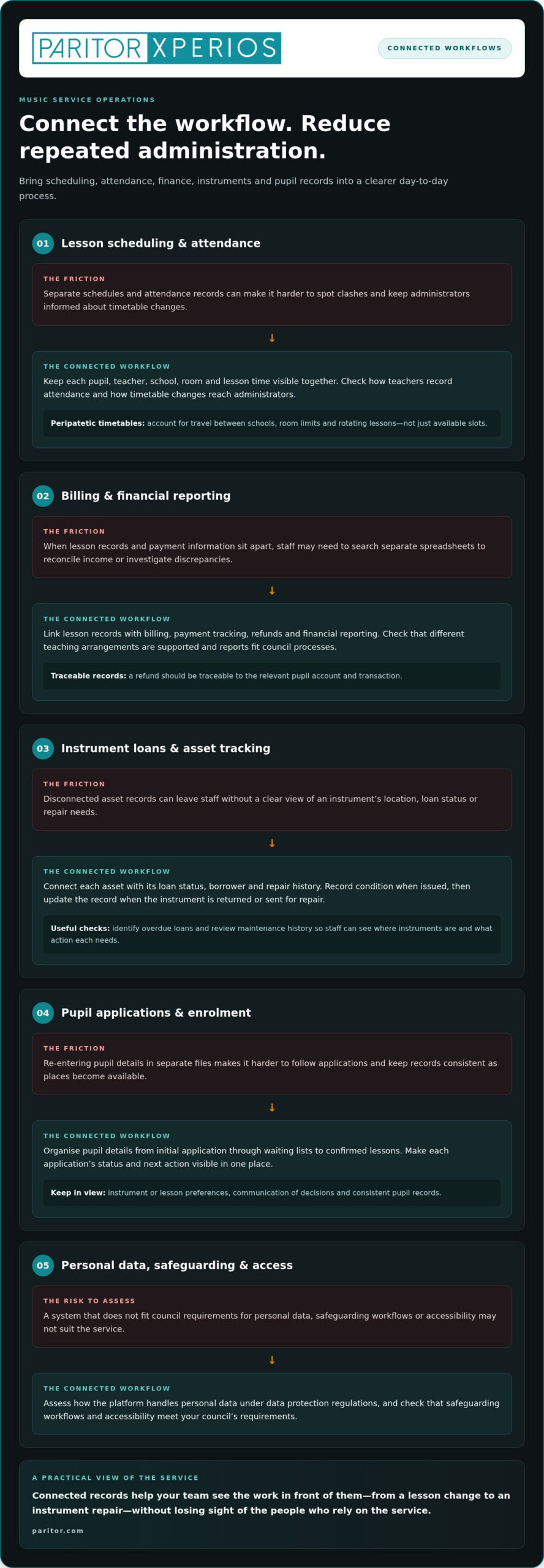
An integrated music-service management platform can connect scheduling, attendance, finance, instruments and pupil records. For local authority use, assess how it handles personal data under data protection regulations, and whether its safeguarding workflows and accessibility meet your council’s requirements.
Lesson scheduling and attendance
Integrated platforms can bring lesson scheduling, attendance and teacher allocation into one workflow. For example, a timetable should show each pupil, teacher, school, room and lesson time, helping staff spot clashes before confirming bookings. Check how teachers record attendance and how timetable changes reach administrators. Timetables for peripatetic teachers should account for travel between schools, room limits and rotating lessons, not just available slots.
Billing and financial reporting
Choose a system that links lesson records with billing, payment tracking, refunds and financial reporting. Administrators should, for example, be able to trace a refund to the relevant pupil account and transaction. Check how the system handles different teaching arrangements and produces reports for council processes. Clear records help teams reconcile income and investigate discrepancies without searching through separate spreadsheets.
Instrument loans and asset tracking
Instrument management software should connect each asset with its loan status, borrower and repair history. A practical workflow records an instrument’s condition when issued, then updates its record when returned or sent for repair. Check whether staff can identify overdue loans and review maintenance history. Consistent asset records help teams see where instruments are and what action each one needs.
Pupil applications and enrolment
Application and enrolment tools should organise pupil details from initial application through waiting lists to confirmed lessons. Staff should be able to see an application’s status and next action without re-entering details in separate files. Check how the system records instrument or lesson preferences and communicates decisions. A clear process helps administrators manage demand and keep pupil records consistent as places become available.
Data migration, training and implementation
Plan implementation around the records, roles and processes your council already uses. A staged approach helps identify data issues before staff rely on the new system.
Prepare records before migration
Start by listing the information held in existing databases and spreadsheets. This may include pupil details, teacher assignments, lesson records, instrument loans and payment histories. Identify duplicate entries, inconsistent formats and fields that no longer support service delivery. Then agree which records need to move, who owns each dataset and how staff will check its accuracy. Clear decisions at this stage reduce confusion during migration.
Test the transfer and protect access
Map each source field to its destination before transferring records. For example, confirm that a pupil identifier, school and lesson status remain separate fields after migration. Test a sample against the original records and resolve errors before transferring the wider dataset. Councils should also assess how the cloud-based platform handles access, storage and personal information against data protection regulations and internal security processes.
Train staff around real tasks
Training works best when it reflects each user’s responsibilities. Administrators can practise updating records and handling enrolment tasks, while teachers learn to access timetables and submit attendance. Use examples from your service, such as recording a lesson change or updating an instrument loan. Provide clear instructions for recurring tasks so staff can apply what they learn in day-to-day work.
Implement in manageable stages
Set out a sequence covering preparation, migration, testing, training and launch. Assign a council lead to make decisions and a contact to answer staff questions. Before launch, check that key users can complete essential tasks and that migrated records are usable. After implementation, gather feedback from administrators and teachers, then prioritise adjustments by their effect on daily work. A planned rollout helps your team adopt new processes while keeping teaching activity in view.
Use these steps to shape a music service software plan around your council’s data and working practices.
Special Educational Needs data matched between music services and local authority records at an average level of 80%. The UK government engaged with local authorities and software suppliers to support local implementation ahead of business rates billing.
Local authority software
Local government music services can operate under different structures, so software should reflect who owns decisions and records. One report classified 26 services as centrally controlled, 11 as shared local authority services, and 13 as partnerships between a council and independent providers. It also classified 16 as private companies limited by guarantee or independent charities. These distinctions affect who needs access, which teams approve changes and how information moves.
Start by mapping responsibilities across music education, finance, schools and asset management. Identify, for example, who approves a new pupil record, updates a teacher’s access and reconciles lesson income. Then match each task to a system role. Clear permissions help staff access the information they need without making every user an administrator.
Assess the cloud-based platform against your council’s security and data protection processes. Consider how it stores pupil and staff information, manages access when roles change and records updates. For example, a manager reviewing an instrument record should be able to see its loan status and maintenance history. Check that authorised staff can access these records across service locations.
Compare systems using practical service scenarios, not just feature labels. Test whether an administrator can follow a pupil record from application to lesson, a finance colleague can trace a transaction, and an asset officer can review an instrument’s history. Include staff from each team in the assessment. Their feedback can reveal duplicate data entry or unclear handovers before implementation.
Record your decision criteria and assign an owner to each. A council may prioritise role-based access, clear reporting, instrument records or links between administrative tasks. Agree which workflows matter most, then check how each system supports them in a demonstration. This helps you select software that fits your service structure and supports consistent day-to-day work.
Local authority software solutions
UK music service platforms differ in how they connect education administration, reporting and daily tasks. Compare them against the work your team needs to complete, not feature lists alone.
Features and usability
Ask staff to complete the same practical tasks in each system demonstration. Can an administrator find a pupil’s lesson details, update a booking and locate the relevant record without switching systems? Can a teacher find their timetable and submit attendance? These tasks reveal how clearly each system supports administrators and teaching staff. Also assess whether menus, terminology and screens make sense to users with different responsibilities.
Choosing and procuring software
For procurement, begin with written service requirements and involve music staff, council procurement colleagues and information governance. Separate essential functions, such as pupil administration, from preferences that can be considered later. Ask suppliers to demonstrate your actual workflows, including a lesson change or a request for a management report. Record how each platform meets the requirements, handles data and supports implementation, then compare responses against the same criteria.
Managing lessons and pupils
Music service management software can bring pupil records, lesson arrangements and attendance into one shared system. Check whether staff can follow a pupil from application through allocation to active lessons, and see the next administrative action. A waiting-list record, for example, should show a pupil’s preferred instrument and current status. Teachers need a straightforward way to access schedules and attendance tasks, while managers need a useful overview of service activity.
Use a short evaluation checklist to compare usability, reporting, access controls and support for education workflows. Explore music service software against the tasks your local authority needs to manage.
Paritor: Xperios for Music Services
Paritor’s Xperios for Music Services brings music-service administration into a cloud-based management platform. It supports scheduling, bookings, attendance tracking and automated invoicing, helping your team manage connected workflows in one place.
Your service has its own working practices, roles and priorities. A partnership-led approach to considering those needs can help you assess how the system could support your team. Xperios also includes options for music and performing arts organisations, private teachers and ensembles, so you can consider the offering that best fits your setting.
If you’re ready to explore how Xperios could fit your music service, visit paritor.com.
Make your next step count
Choosing software for local authority music services is an opportunity to shape administration around your team’s and learners’ needs. Before moving forward, agree which workflows matter most, who will use the system and how you’ll assess its impact on daily work. Shared priorities give your council a practical basis for planning adoption and involving staff in the change.
Paritor offers Xperios for Music Services, Xperios for Performing Arts and Xperios for Private Teachers. These options suit different settings, so consider which aligns with your organisation’s work and users. A considered choice can reduce administrative friction and keep attention on music education.
Contact Paritor about music service software to explore the next step for your service. Build a system that supports your people and gives them more room to focus on teaching.
Frequently Asked Questions
Does music service software integrate with council finance, payroll, MIS, and payment systems?
Integration depends on the platform and the council systems involved. Xperios supports integration with third-party accounting software and local authority systems, and includes online payment processing. Treat payroll and MIS connections as separate procurement requirements: document which records must pass between systems, who maintains them and how staff will handle exceptions. For software for local authority music services, this helps you assess integration against real council workflows.
What are the risks and migration steps when replacing music service software?
Key risks include missing records, duplicated pupil details, disrupted access and reports that no longer match council processes. Before replacing a system, record which teams rely on each dataset and identify essential historical records. Test representative records in the new system, then compare totals and sample entries with the source. Plan a cutover point, agree who will resolve errors and retain an approved way to consult historical information.
Which software do local authority music services use in England, Scotland, Wales, and Northern Ireland?
There isn’t one standard platform used by every music service across the four UK nations. The right system depends on each service’s structure, workflows and council requirements, so compare products against those needs rather than assuming a national standard. Paritor provides Xperios for Music Services for music-service administration. Before selecting a platform, assess how it supports your team’s processes, access arrangements and reporting.