A repair isn’t fully tracked when an instrument comes back. The record should show what was found, what was done and what happens next. A log for managing instrument repairs brings together the instrument’s condition, repair work, actions and progress updates. Whether it’s on paper or digital, it should make each instrument’s maintenance history easy to follow.
Repair details can become scattered across messages, notes and conversations, especially when several people need to know whether an instrument is ready to use. A consistent log gives everyone one clear record of the issue and its status, so staff can follow up without relying on memory.
This article explains what an equipment maintenance log records and how it helps you track condition, corrective actions and repair progress. It also covers how current, well-organised records make maintenance history easier to understand and help staff decide what needs attention next.
Key Takeaways
- Keep a clear record of each instrument’s condition, maintenance work, responsible person and follow-up action.
- Distinguish preventive, predictive and emergency maintenance so planned work and urgent repairs are easier to track.
- Record progress updates as repairs move forward to give everyone involved a shared view of the instrument’s status.
- Use consistent equipment identifiers to connect each instrument with its repair history and make records easier to find.
- Review and update logs regularly to spot recurring issues and support informed decisions about future maintenance.
Table of Contents
- What is Equipment Maintenance Log?
- Real-time repair tracking and progress updates
- Benefits of keeping logs up to date
- Condition assessments and corrective actions
- Equipment identification details
- Paritor: Xperios for Music Services
What is Equipment Maintenance Log?
An equipment maintenance log is a paper or digital record of work performed on an asset. It can bring an instrument’s condition, repair history and next service date together in one place. A log for managing instrument repairs also helps staff see what has been done and what still needs attention.
Types of maintenance
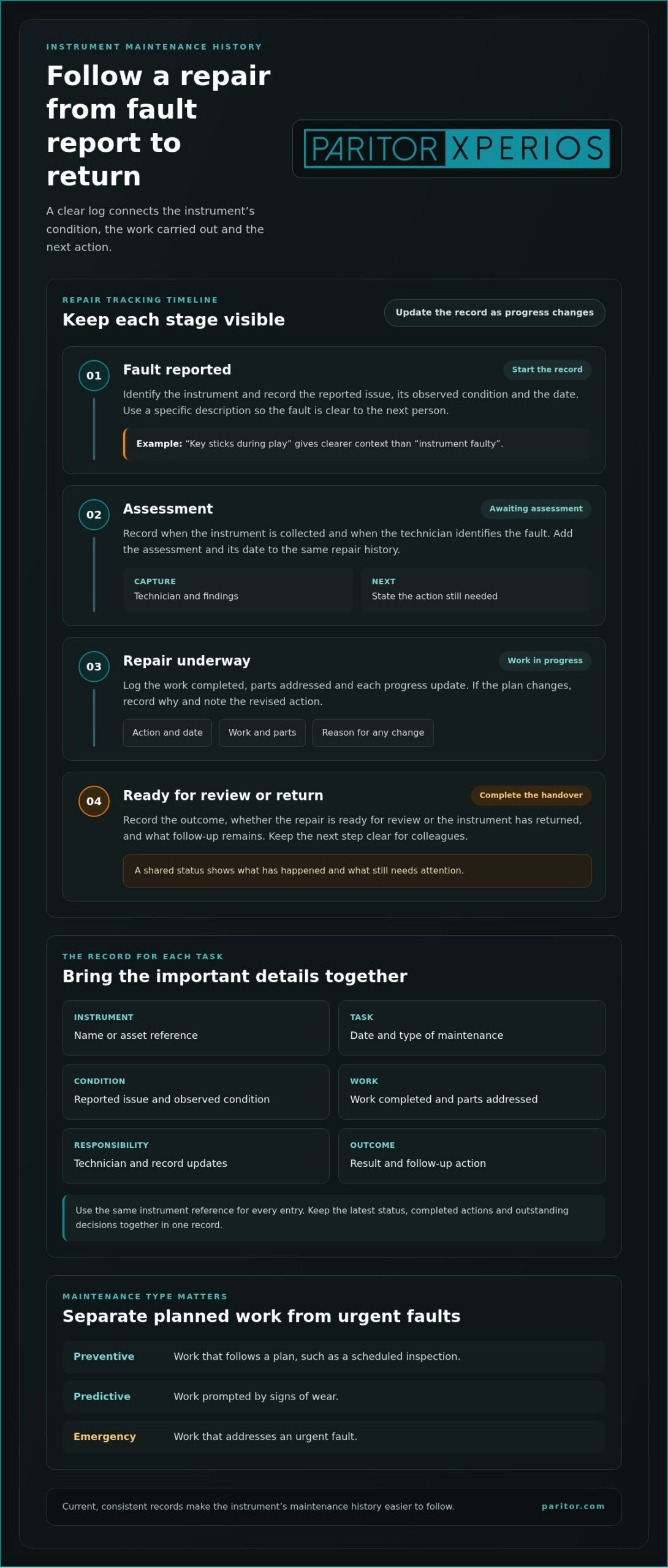
Preventive maintenance follows a plan, predictive maintenance responds to signs of wear, and emergency maintenance addresses urgent faults. Distinguishing these types helps staff separate planned tasks from repairs prompted by a change in an instrument’s condition. For example, a scheduled inspection is preventive, while a repair after a newly observed fault is corrective or emergency work. Recording each type supports future servicing decisions and can help protect an instrument’s lifespan.
Details recorded for each task
A useful entry identifies the asset and explains what happened during the maintenance task. Record the instrument’s name or asset reference, date, reported issue, observed condition, work completed, parts addressed, technician, outcome and follow-up action. For UK calibration and repair records, follow the instrument’s applicable standard, contract or local procedure; record the calibration date, result or status, repair details and next due date.
To create a log in Excel or Google Sheets, use one row per task and add columns for these details. Include the instrument identifier, task type, status and next service date. For example, filter the status column to find repairs that remain open. A consistent layout makes entries easier to log and review.
Log purposes and uses
Maintenance records show what work an instrument has received and how its condition has changed over time. This history supports decisions about repeating a repair, arranging another inspection or planning a replacement. It also helps staff answer practical questions, such as whether an instrument has returned from repair and what action remains. Records are most useful when they’re current, consistent and accessible to the people responsible for the equipment.
If the same fault appears in successive entries, the recorded dates and actions give staff a basis for reviewing the pattern. Include observations as well as completed work, so the next technician can see what prompted the original response. A maintenance log is more than a list of repairs: it connects each action to the instrument’s condition and service history. This makes a log for managing instrument repairs more useful when planning follow-up work.
Schedules and service intervals
A maintenance schedule sets out planned tasks and when they are expected to be completed; a service interval describes how often a task should recur. Record the task, trigger, last completed date and next scheduled date, then update the entry when work is done. This makes overdue tasks easier to spot and distinguishes planned inspections from unplanned repairs.
Intervals depend on the equipment and its maintenance plan. One maintenance log example sets a hydraulic press service interval at every 250 hours, a forklift at every 50 hours, and an air compressor at every 500 hours. These are examples for those machines, not universal intervals for instruments. For an instrument, use the interval that applies to its own servicing plan, and keep the maintenance schedule current.
Real-time repair tracking and progress updates
A repair record is more useful when it shows whether work is awaiting assessment, underway or complete. Consistent updates help staff coordinate decisions and communicate an instrument’s status. Managing an instrument repair log means keeping its current stage clear, not just storing the original fault report.
Live repair progress
Live tracking means updating a repair request as its status changes, from fault report through assessment and repair to return. A shared status helps staff see what needs attention without searching through separate messages. For example, record when an instrument is collected, when a technician identifies the fault and when the repair is ready for review. Each update should state the action and its date.
Monitoring open requests can help teams respond promptly and prevent minor problems from escalating. Add a next action to each open entry, such as arranging an inspection or recording a repair decision. If progress changes, document the reason and revised action. This gives colleagues a clear point to pick up from, even when the person who logged the fault is unavailable. “Awaiting assessment” is more useful when paired with the expected next step.
Centralised repair records
Centralised repair tracking keeps requests, updates and related documents together in one record for each instrument. Staff can find the current status without piecing together email threads, paper notes and separate files. A shared record should show who updated it, the latest status, completed actions and outstanding decisions.
For example, link a technician’s assessment and repair report to the same request instead of saving them under separate filenames. Keep warranty information with the relevant repair history, including the instrument identifier, warranty document, fault description and repair dates. If a claim is considered, the record helps staff gather the details and follow its progress. Give access to colleagues who need the information to manage the repair or make a decision.
Fault and maintenance history
A fault and maintenance history is a dated sequence of reported problems, inspections, repairs and follow-up actions for one instrument. Use the same asset reference for every entry and describe the fault specifically. For example, “key sticks during play” gives clearer context than “instrument faulty”. Specific descriptions make later searches and comparisons more useful.
Templates can be created in a spreadsheet or document, with fields for the asset reference, fault, status, update date and next action. Keep one entry per repair event, then sort or filter by instrument and status. Teams managing instrument repair logs can use this view to identify open requests and review past work. Connecting repair updates to an instrument’s wider asset record, as supported by instrument management information, also keeps those details together for later reference.
Benefits of keeping logs up to date
Current equipment maintenance records give staff a reliable view of what has happened and what needs attention. When an instrument returns from repair, for example, an updated entry can show its status, any follow-up inspection and whether it’s ready for use. Keeping that information current helps staff make decisions from the same record rather than relying on separate notes or memory.
Up-to-date logging also supports preventive maintenance. A record of completed tasks and upcoming inspections can help teams plan work before a fault interrupts normal use. Proactive maintenance scheduling with an equipment maintenance log is associated with a 15% reduction in equipment downtime. This is an association, not a guaranteed result for each organisation, but it shows why planned tasks and their completion dates matter.
Incomplete instrument repair records can hide recurring faults, leave follow-up actions unclear and make it harder to assess an instrument’s condition. If an entry omits the work completed, for example, the next technician may not know what has already been addressed.
Consistent entries also help staff identify trends in maintenance history. Compare fault descriptions and repair outcomes for the same instrument. Repeated reports of a sticking key, for instance, may prompt a closer inspection. That pattern gives staff useful context for planning future servicing. Without current dates and outcomes, comparisons may be misleading and decisions about further maintenance may overlook relevant history.
- Planning: Use the latest completion date to review the next scheduled task.
- Coordination: Record the current status and next action so colleagues can continue the repair process.
- Review: Compare repeated fault descriptions and outcomes to identify possible patterns.
Software can make logging easier to review by keeping records in a consistent format. A central record can be filtered by instrument, status or task type, helping staff find open work and past repairs. Streamlined data capture and reporting with an equipment maintenance log is associated with a 20% improvement in maintenance efficiency. Clear fields and regular updates help make information more useful for day-to-day decisions.
Keeping logs current supports decisions about inspection, repair or replacement. If an instrument has repeated faults, staff can review its recorded history alongside its present condition before deciding what to do. A current record also helps show whether planned preventive maintenance was completed. Updating each entry after work, rather than later, reduces gaps between the task and its recorded history.
Condition assessments and corrective actions
A condition assessment records what an instrument looks, sounds or feels like during an inspection. Pairing observations with a corrective action gives each maintenance activity a clear reason and outcome. For example, record that a piano key sticks rather than writing only “repair needed”. This gives the person handling the issue a useful starting point and makes the equipment maintenance log more informative.
Keep observations factual and separate from diagnosis. Record when the issue appeared, how it affects use and whether it has changed since the previous inspection. For a violin with a loose fitting, document the observed movement and any relevant change. Don’t present a suspected cause as certain before it has been assessed. This helps staff distinguish what was observed, what was concluded and what action followed.
Corrective actions should connect the reported condition to a specific next step. This might be a closer inspection, a repair assessment or monitoring the instrument at its next scheduled check. Record who is responsible, the current status and the outcome once the action is complete. If it’s deferred, note the reason and when it should be reviewed. Clear records distinguish open work from completed maintenance.
- Observation: Record the symptom, such as a loose bow screw or intermittent sound.
- Assessment: Note the inspection finding separately from the original report.
- Action: State what follow-up is needed and who will progress it.
- Outcome: Update the record after the work, including any remaining issue.
Use consistent condition descriptions so staff can compare entries. “Surface scratch near the bridge”, for example, is more useful than “poor condition”. Add photographs or supporting documents where your record-keeping process allows, and link them to the same instrument reference. If a later inspection finds the scratch unchanged, that comparison adds context. If the condition has changed, the record can show why further assessment may be needed.
Condition notes also support decisions about preventive maintenance and downtime. If an instrument is needed for a lesson or performance, record its availability alongside the identified issue. Staff can then coordinate a suitable next step and avoid treating an unresolved report as completed work. Update the record when the instrument’s status changes, such as after inspection or repair, so colleagues have a current view without relying on separate conversations.
Review condition entries alongside past maintenance activities to identify repeated symptoms or incomplete actions. For instance, recurring reports of stiff keys on a wind instrument may prompt a review of its repair history. The pattern doesn’t prove a cause, but it gives the assessor relevant context. Recording observations, decisions and outcomes in sequence creates a clearer basis for future inspections and maintenance planning.
Equipment identification details
Every repair entry should clearly identify the instrument it describes. A stable asset reference connects faults, inspections and work orders with the correct item, even when instruments share a model or description. “Flute” alone may refer to several instruments, while an assigned asset tag distinguishes the one needing attention. Accurate identification makes equipment maintenance logs easier to search and review.
Build each instrument’s record around details that distinguish it from others in your collection. These may include its asset reference, instrument type, make or model, serial number where available, and location or assigned user. Use the same reference across repair requests and maintenance documents. If a flute moves between storage and a teaching location, recording its current location helps staff find the right instrument before arranging an inspection.
- Asset reference: Use one unique identifier consistently in each record and work order.
- Instrument description: Include a type and distinguishing details, such as model or serial number.
- Location: Record where the item is kept or assigned, then update it after a move.
- Record link: Connect the identifier to the instrument’s maintenance history.
Asset tags and QR code scanning can help generate work orders with equipment identification and historical maintenance records. A staff member can scan a tag, open the matching asset record and link a reported fault to its history. This reduces the need to re-enter instrument details each time. Keep the printed identifier readable and make sure the digital record uses the same reference.
Identification matters when an instrument fails during a lesson or event. A clear record helps staff distinguish the affected item from similar equipment and find its previous inspections or repairs. Two recorders may look alike, for example, but their asset references connect each one to its own maintenance history. This helps prevent repair details being attached to the wrong instrument.
For organisations managing instruments across several locations, location fields provide useful context for equipment use and maintenance. If an item is regularly moved or returned for inspection, its record can show where it was used and what maintenance followed. Treat location as a current detail, not a permanent label. Updating it after a transfer keeps searches and work orders relevant.
A well-identified asset record is valuable because it joins equipment details with the instrument’s maintenance history. Before logging a new repair, match the instrument’s tag or reference to its record, then attach the request and related documents. This simple check supports accurate reporting and helps staff review past work before planning another action.
Paritor: Xperios for Music Services
Paritor’s Xperios for Music Services helps music organisations manage administrative work and instrument records in one cloud-based platform. If repair details and asset information are spread across separate files, Xperios Instrument Management helps organise instrument records and maintain their service history. Staff can get a clearer view of each instrument’s record as its needs change.
Xperios for Performing Arts, Xperios for Private Teachers and Xperios Ensemble Management support different music and performing arts settings. The right option depends on how you manage your service, teaching administration and instruments. By reducing manual administration, Xperios can help you spend more time supporting teaching and learning.
Contact Paritor or visit paritor.com to discuss your music service’s administration needs.
Make repair records part of your routine
Make record-keeping part of how your organisation hands over instruments and maintenance tasks. Decide who updates a repair entry, when its status changes and how staff find the relevant record. A shared routine helps prevent details being lost between a fault report, an assessment and the instrument’s return to use.
As your collection and teaching activity change, review whether your process gives staff the information they need. A simple approach to managing an instrument repairs log should fit naturally into existing work, not add another layer of administration. Clear responsibilities and consistent records can help your team focus on supporting teaching and learning.
If you’re considering how digital music service management could support your administrative work, contact Paritor to discuss your needs. A practical conversation can help you consider what suits your organisation. Take the next step towards making instrument administration easier to manage.
Frequently Asked Questions
What information should an instrument repair log include?
Include enough context for someone unfamiliar with the repair to understand the record. Alongside the instrument reference and work details, note who reported the issue and how it affected use. “Reported by rehearsal lead, intermittent sound during ensemble practice” explains more than “sound problem”. If the instrument needs another review after its return, record that follow-up separately so it isn’t mistaken for completed repair work.
How to record repair dates, parts, labour, and warranty details?
Use separate fields for the date received, assessment date and return date, since each marks a different stage. Describe each part and note the quantity fitted; record labour as time spent and the task performed. Add the warranty document or reference, relevant coverage dates and any claim correspondence to the instrument’s file. Keeping these details distinct makes it easier to trace what happened if a repair needs review.
What rules apply to maintaining calibration and repair records for instruments in the UK?
Follow the instrument’s applicable standard, contract or local procedure. Record the calibration date, result or status, repair details and next due date.
Are there instrument repair log templates available in the UK?
Create a repair log template in a spreadsheet or document, with fields for the instrument identifier, task type, status, update date and next action. Use one entry per repair event.
Best software for managing instrument repairs and maintenance logs
Choose a digital or CMMS-integrated system that brings each instrument’s repair history, current status, documents and follow-up actions together. Useful features include shared access, mobile reporting, equipment identification, and workflows for assigning and tracking repairs.