What if orchestra administration could keep schedules, people, finances and instrument records connected without adding another layer of work? When information is spread across spreadsheets, email and separate systems, routine tasks can take time away from supporting musicians and making music. Choosing orchestra administration tools is more than a software decision. It is a chance to make everyday work easier to manage and maintain.
You need a system that fits how your team works, keeps important records accessible and helps you maintain instrument histories. This guide explains how to assess your workflows, compare separate tools with a connected cloud-based platform, and review usability, access and data protection. It also explains how Xperios for Orchestras connects administrative workflows, with data hosted in UK Microsoft Azure data centres. Use the practical criteria here to identify duplicated admin, improve asset oversight and give your team more time for music.
Key Takeaways
- Assess orchestra administration tools by the workflows they support, from schedules and communications to instrument records.
- Compare spreadsheets, separate systems and a connected platform for shared records, access, reporting and data protection.
- Prepare for adoption by assigning record ownership, organising information and reviewing instrument maintenance histories.
- See how Xperios for Orchestras brings together modules for Schedules, Contacts, Finances, Reports, Resources and Events.
- Consider how UK-hosted data and a cloud-based platform can support team access and help protect organisational information.
Table of Contents
- What should orchestra administration tools help your team manage?
- Which orchestra administration workflows can one platform connect?
- Connected platform or separate tools: how should orchestras compare options?
- How can you prepare your orchestra to adopt administration tools?
- How Xperios for Orchestras supports connected administration
What should orchestra administration tools help your team manage?
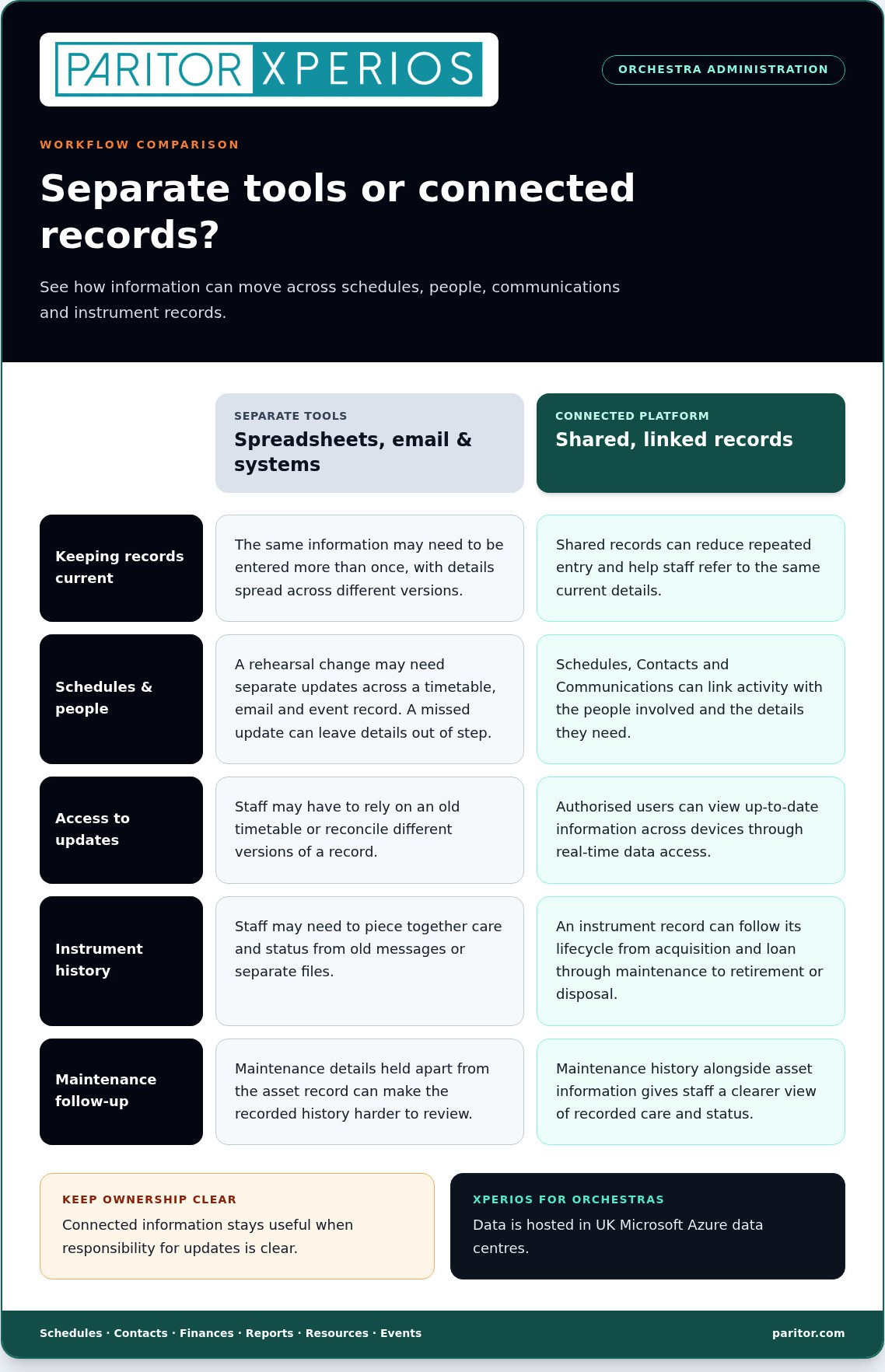
Orchestra administration tools should support the operational work behind an orchestra, not simply display a calendar. Your team may coordinate people, rehearsals, events, communications, shared resources and records at the same time. When these details sit in separate spreadsheets, email threads and systems, staff may have to enter the same information more than once or work from different versions of a record.
The aim is dependable coordination, not software making artistic decisions. Musical direction, repertoire choices and performance decisions belong with the people responsible for them. Clear, accessible administrative information helps those people and the staff supporting them focus on their respective work.
Which administrative workflows need reliable records?
Start with the information your team needs to find and keep current in its routine work. The right mix depends on your organisation’s structure and how it runs rehearsals and events. Common responsibilities include:
- Contacts: keeping relevant details for musicians, staff, venues and other working relationships together.
- Schedules: coordinating rehearsal and event dates, times and the people involved.
- Resources: recording the shared spaces, equipment or instruments that need to be available.
- Events and communications: linking event details with the information people need to prepare and take part.
When each workflow has its own record, a change to a rehearsal time may need to be updated in several places. One missed update can leave a schedule out of step with an email or event record. Connected information can reduce repeated entry and help staff refer to the same current details. Make sure responsibility for updates is clear, so the shared information stays useful.
What makes orchestra administration different?
Orchestra administration involves coordinating people, rehearsals, events and shared resources around a working musical organisation. It supports the orchestra’s activity without replacing artistic judgement. The wider field of Arts Administration covers the organisational work involved in managing cultural organisations, while each orchestra’s records reflect its own structure and activities.
Instruments add another operational consideration. A useful record can follow an instrument through its instrument lifecycle, from acquisition and loan through maintenance to retirement or disposal. Keeping maintenance history alongside asset information gives staff a clearer view of recorded care and status, instead of making them piece the history together from old messages or files.
Good administration doesn’t direct the music. It gives your team a clearer view of the practical details that support it, so staff spend less time reconciling records and more time helping the orchestra run smoothly.
Which orchestra administration workflows can one platform connect?
A connected platform is useful when it links records that support related responsibilities, rather than simply putting separate functions under one login. When comparing orchestra administration tools, consider how a change in one area affects another. A revised rehearsal schedule may need to reach the right people, while an instrument loan needs a record staff can refer to later. Shared records can reduce repeated updates and help authorised users work from consistent information.
How do schedules, contacts and communications work together?
Schedules record when activity takes place, Contacts link that activity to the people involved, and Communications help staff share relevant information. Together, these workflows support practical coordination. For example, when a rehearsal time changes, staff can update the schedule and make current details available to authorised users. With real-time data access, permitted users can view up-to-date information across devices rather than relying on an old timetable.
A teacher portal is a mobile-responsive interface for teachers to log attendance, progress and instrument updates. It gives teachers a route to submit relevant information within the system, helping staff maintain clearer records. Access should suit each user’s role, so people can find the details they need without making every record open to everyone.
Connected administration can also link event planning with resources and financial oversight. For example, staff can consider an event’s schedule alongside the resources it requires, while financial records support the organisation’s own oversight processes. The League of American Orchestras Governance Resources provides context on governance and organisational oversight, including financial matters.
How should tools handle instruments and maintenance history?
An instrument record is more useful when it follows the instrument through its instrument lifecycle: acquisition, loan, maintenance and retirement. Keeping maintenance history with the asset record helps staff understand its recorded care and status without reconstructing details from separate files. See the instrument inventory management software guide for a closer look at organising asset information.
For teams managing loans and planned upkeep, automated notifications are system-generated alerts for overdue returns or scheduled maintenance. They can flag a follow-up, while staff remain responsible for reviewing and acting on the information. Resources and Reports can help bring relevant records into view. Choose the reports and asset fields that match your organisation’s processes.
As you map your workflows, note where each record is created, who updates it and which other responsibilities depend on it. This gives you a practical basis for assessing a connected approach, including Paritor’s orchestra administration platform, against your team’s needs.
Connected platform or separate tools: how should orchestras compare options?
Specialist workflows don’t have to mean disconnected systems. The right choice depends on whether your tools reflect how your orchestra works and give staff dependable access to the records they need. Compare options against real responsibilities, such as scheduling, instrument oversight and reporting, rather than counting features alone. The Orchestra Management Handbook offers broader resources for orchestra managers, including guidance on management and governance.
| Consideration | Spreadsheets | Separate tools | Connected administration platform |
|---|---|---|---|
| Workflow fit | Flexible for simple lists, but processes may rely on manual updates. | Each tool may suit a specific task, with separate ways of working. | Can bring related responsibilities together around shared workflows. |
| Shared records | Copies can diverge if updates aren’t carried across files. | Information may need to be entered or maintained in more than one place. | Shared records can reduce duplicate entry across connected areas. |
| Access and asset history | Access and record visibility depend on how files are stored and shared. | Users may need to move between systems to find records. | Can give authorised users access to relevant records, including instrument history. |
| Reporting and data protection | Information may need to be gathered from separate files. | Records and reporting are held across different tools. | Can bring related information together; hosting and data protection arrangements still need careful review. |
Which criteria reveal whether a tool fits your workflows?
Begin with the responsibilities your team handles, then map each to the records and users involved. Check that the system supports those workflows without requiring functions you don’t need. Consider administrators, teachers and other users separately: what information does each group need to access or update? Related scheduling needs may also arise across ensembles, as discussed in this ensemble management software guidance.
For instrument oversight, assess whether asset records retain maintenance history and support the instrument lifecycle. For reporting, check whether staff can find information for routine oversight without rebuilding it from separate sources. Orchestra administration tools should fit your organisation’s working practices, rather than making the team reshape its responsibilities around software.
How should you assess information security and access?
Ask where information is hosted and how access is managed. Data sovereignty means storing data within a specific national jurisdiction. Xperios data is hosted in UK Microsoft Azure data centres, which are ISO 27001 accredited. The platform includes GDPR compliance tools. Consider these arrangements alongside your own data protection requirements.
Xperios has a service level agreement (SLA) guaranteeing 99.9% uptime. This is a stated service commitment, not a promise that interruptions can never occur. Include hosting, access controls and service commitments in your comparison, so the system supports your administrative needs and the secure handling of organisational information.
How can you prepare your orchestra to adopt administration tools?
A considered start helps your team move from familiar processes to a new system without losing sight of daily responsibilities. Before choosing or setting up orchestra administration tools, agree what the system should support, who will maintain its records and how users will learn their part. Treat preparation as a team process, not simply a data transfer.
- Map workflows. Follow key activities from start to finish, such as arranging an event, updating a schedule or managing an instrument loan. Note which records each step relies on and where information is currently kept.
- Assign ownership. Decide who maintains contacts, schedules, resources, events, financial records and instrument information. Clear ownership gives staff a route for resolving conflicting or incomplete details.
- Organise records. Gather the information the team needs, then identify missing, duplicated or out-of-date entries before moving records into a new system.
- Plan access and training. Match user access to responsibilities, consider data protection regulations when handling personal information, and explain changes to staff before new processes become routine.
What information should you organise before setup?
Bring together the working records your team relies on: contact details, schedules, resource information, event records and financial information. For instruments, gather available lifecycle details, including acquisition, loan and maintenance history, plus retirement or disposal records where relevant. Agree who will review each record, how staff should report errors and how changes will be managed. This gives you a practical way to check information while recognising that each organisation may keep different records.
Pay particular attention to asset information. Compare instrument records across files and systems to find duplicates, gaps or inconsistent details. If a maintenance entry is missing, flag it for review rather than treating an incomplete record as a confirmed history. Preparing this way helps staff distinguish information that is ready to use from details that need follow-up.
How can you support adoption across the team?
Training works best when it reflects each person’s routine tasks. Administrators may need guidance on maintaining records and reviewing reports, whilst teachers need support with tasks relevant to their work. Set out how staff can raise questions and make sure everyone understands who owns updates. Clear communication helps the team adopt consistent processes at a manageable pace.
The teacher app supports offline use and syncs changes when internet is available. Users need to be online to make changes to information, so explain how offline access and syncing work during training. This helps staff understand when a change can be shared across the system.
With workflows, records and responsibilities prepared, your team has a clearer starting point for adoption. Explore Paritor’s orchestra administration platform to see how connected administration can support your organisation’s work.
How Xperios for Orchestras supports connected administration
Xperios for Orchestras is Paritor’s platform for supporting the administrative work around orchestra activity. Its modules let you consider related responsibilities within one system, while keeping the focus on the processes your organisation needs. Instrument maintenance history is also part of asset oversight, giving staff recorded care details to refer to when reviewing an instrument’s information.
How do Xperios modules map to orchestra administration?
Each module relates to a different area of administration. Assess them against the tasks your team handles and the information it needs to maintain:
- Schedules and Contacts relate to coordinating activity and the people involved.
- Finances and Reports support financial administration and the review of relevant information.
- Communications supports sharing information as part of your team’s administrative processes.
- Resources and Events relate to managing shared resources and event administration.
Take a task your team completes regularly and identify the records and responsibilities it touches. Event administration, for example, may involve schedules, contacts and resources. Looking at those relationships helps you judge whether the modules fit your working practices, rather than selecting features in isolation. Your organisation can focus on the areas that match its needs and responsibilities.
Instrument maintenance history is another useful consideration when assessing asset oversight. A record of maintenance gives staff details to refer to when reviewing an instrument’s history. This supports a clearer view of the records your team maintains, without confusing administration with decisions about musical use or artistic direction.
What supports confidence in the platform?
Paritor brings over 25 years of tuition-management experience to its software development. A user-centred approach matters because a system’s practical value depends on how well it fits the people and processes that rely on it. As you assess Xperios, consider how its modules relate to your team’s daily responsibilities and whether users can incorporate them into established routines.
Involve the staff who manage records and coordinate activity in your assessment. Their perspective can clarify which workflows should connect and where a module could support an existing process. This keeps the decision grounded in your orchestra’s needs, rather than a generic feature list.
If you’re assessing orchestra administration tools, explore how the platform’s modules relate to your organisation’s priorities. Explore Xperios for Orchestras and discuss your administration needs with Paritor.
Make space for your orchestra’s next steps
Choosing orchestra administration tools is a chance to shape processes around how your team works, rather than simply transferring old habits into a new system. Ask staff where information hand-offs cause the most friction, then choose one practical workflow to improve first. A focused start can make change easier to manage.
Include administrators and teachers in that conversation. Their day-to-day experience can help you set priorities, clarify responsibilities and make sure new processes support real working routines. Xperios has managed over one million lessons to date, bringing experience in music administration to the platform’s development.
As your organisation’s needs evolve, keep reviewing whether your tools support the work your team needs to do. Explore Xperios for Orchestras and discuss how its approach could fit your organisation. With the right support behind the scenes, your team can look ahead with greater confidence and give more attention to the music.
Frequently Asked Questions
What are orchestra administration tools?
They are software systems that help staff organise the operational information and tasks involved in running an orchestra. Depending on the organisation, that might include coordinating events, maintaining contact records or reviewing administrative reports. Their role is to support the work around rehearsals and performances, not to make artistic choices. Think of them as a working environment for administrative processes, with functions selected to suit your organisation’s structure.
Can orchestra administration software track instrument maintenance history?
Yes. Xperios for Orchestras supports instrument maintenance history. A record helps staff follow what has been entered about an instrument over time, but it is not a physical inspection or a professional assessment of condition. Decide what maintenance information staff record, who is responsible for entering it and how they distinguish confirmed details from information that still needs review.
How do orchestra administration tools differ from ensemble management software?
Ensemble management software generally focuses on coordinating ensemble activity, whilst orchestra administration can cover a wider range of organisational tasks. The distinction isn’t always absolute. The useful comparison is whether a system supports the work your team needs across groups and other responsibilities. If you manage several ensembles, consider whether their schedules and contacts need to connect with wider organisational processes, or whether group coordination is your main requirement.
Are cloud-based orchestra administration tools secure?
Cloud hosting alone doesn’t answer every security question. Consider both the provider’s safeguards and your staff practices. Decide who should access sensitive records, how access is reviewed when responsibilities change and how staff should handle downloaded or shared files. Then assess the provider’s security and data protection information against your organisation’s processes, rather than treating the word “cloud” as a measure of security.
Can teachers use orchestra administration software offline?
Teachers can use the Xperios app offline, and changes sync when internet access becomes available. Users need to be online to make changes to information. This distinction matters for planning: teachers can access the app while disconnected, but need a connection for changes to reach shared information. Make sure your team understands this workflow so staff know when an update is available to other users.
How should an orchestra choose administration tools?
Use a real working scenario to compare options. Ask an administrator and a teacher to walk through a task they handle regularly, noting where they need information, switch between processes or pass work to someone else. Record what the system supports and where a manual step remains. This practical test can reveal workflow gaps that a feature list may not show and gives different users a shared basis for assessing fit.
What should an orchestra prepare before adopting a new administration platform?
Agree who will make decisions about the platform’s setup and who will answer questions as staff begin using it. Identify a small group of representative users, such as an administrator and a teacher, to review how new processes work before wider use. Set a clear route for reporting incorrect or unclear records, and decide how staff will share changes to established procedures. These steps help make adoption a supported process, not simply an announcement.